Directing a 3D Digital Human Over MCP: Local GPU AI, Custom Models, and Desktop Mode
How AI Digital Human Lab runs Luna on your own GPU (16 GB RAM, 6 GB VRAM) while exposing 40+ scene, voice, and camera tools to Claude or Muse over MCP.
Directing a 3D Digital Human Over MCP: Local GPU AI, Custom Models, and Desktop Mode
Most AI companions ask you to pick between two incomplete worlds: a text-and-voice assistant that understands your tools and context but has no body, or a 3D character showcase locked behind scripted dialogue trees and per-minute cloud billing.
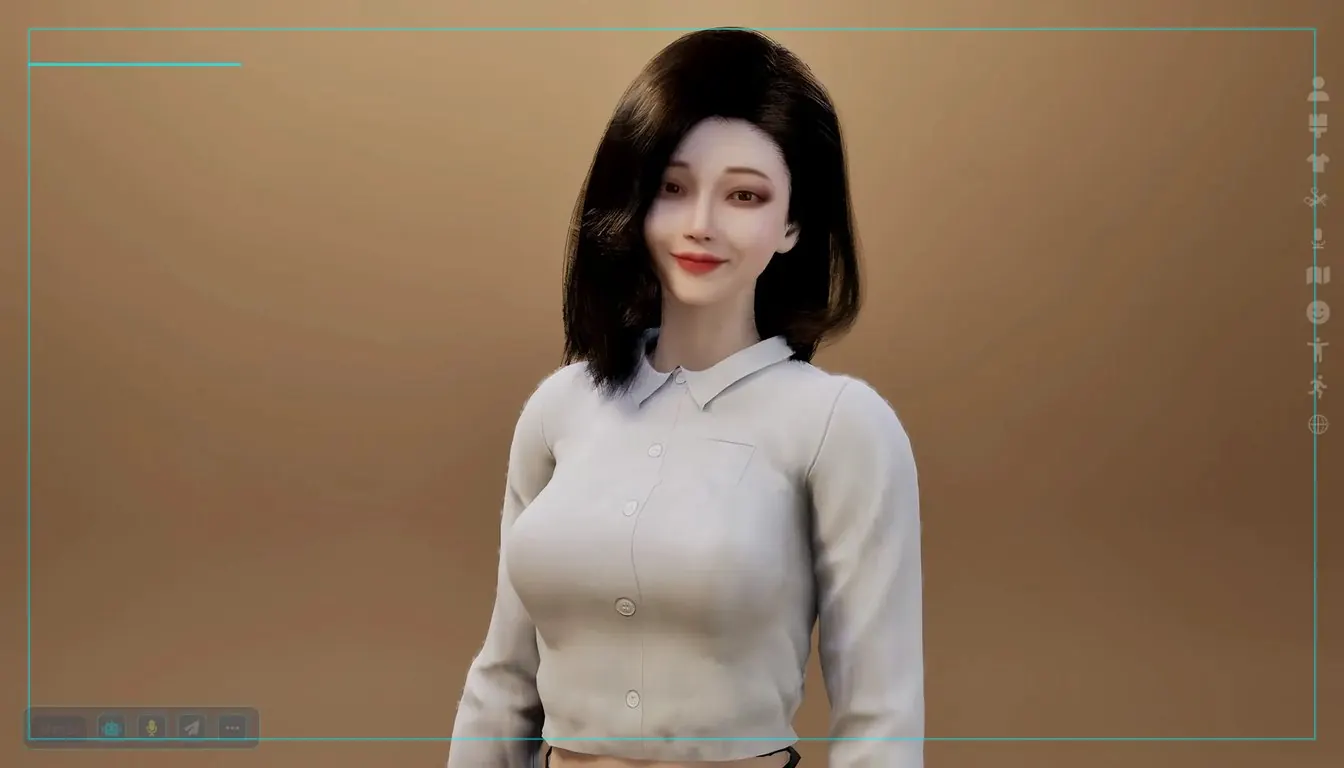
With AI Digital Human Lab, we built Luna (and Orion) around a different split of responsibilities: real-time Unreal Engine 5 rendering, speech synthesis, and default language generation run directly on your own graphics card, while a built-in Model Context Protocol (MCP) server lets the external AI agent you already rely on step in as director whenever you want.
1. What actually runs on your PC (and what hardware it needs)
Out of the box, AI Digital Human Lab requires no account, no subscription, and no API keys:
- Minimum hardware: 16 GB of system RAM and a GPU with at least 6 GB of VRAM on Windows or Linux / Steam Deck, or an Apple silicon Mac. At startup, the app checks free memory before loading Unreal Engine 5 assets so under-provisioned machines show a clear explanation rather than closing silently.
- In-game diagnostics (
F8): PressingF8displays live CPU, GPU, VRAM, and system RAM usage in the top-left corner. On older graphics cards without hardware ray tracing (such as GeForce GTX 10 and 16 series), depth of field turns off automatically to keep hair strands sharp (F7toggles it manually). - Local speech & lip-sync: Nine built-in voices and 10 spoken languages (English, Chinese, Japanese, Korean, German, French, Spanish, Italian, Portuguese, and Russian) synthesize sentence by sentence on-device, driving 74 facial expressions and contextual gestures.
- Local long-term memory: Personal facts you share in chat are stored on your PC under Character → MEMORY, where you can inspect, delete single lines, wipe all entries, or disable memory entirely.
2. Three ways to power Luna's mind
You can switch intelligence backends at any time inside Chat Settings:
- Built-in GPU model (Offline default): Zero per-token cost, works without an internet connection.
- Custom OpenAI-compatible server (
CUSTOM): Available in the Website Direct and Epic Games Store editions,CUSTOMconnects any local or LAN OpenAI-compatible endpoint — includingOllama,LM Studio,llama.cpp server, orvLLM— with an optional bearer key. If your server is offline, Luna falls back cleanly to the built-in model. - Cloud models: Bring your own OpenAI, Gemini, or Grok key in the Website and Epic editions (processed under that provider's terms), or use optional
CLOUDcredits in the Steam edition (every Steam account starts with 50 free credits).
For full edition details, see the AI Digital Human Lab installation guide.
3. Giving Claude or Muse a 3D body with Built-in MCP
Instead of building yet another walled-off plugin ecosystem, AI Digital Human Lab embeds a native MCP server right inside the client:
- Click the robot icon on the chat bar (or type
/mcp bind). - Local desktop agents such as Claude Desktop connect on
localhost— nothing on your PC is opened to inbound internet traffic. - Cloud or mobile agents such as Muse pair via QR code over an outbound-only stateless relay. The status dot on the robot button turns green while an agent is active, and rotating the key immediately revokes prior sessions.
Once bound, your agent gains over 40 structured tools:
- Speak as Luna: Route your spoken or typed conversation to your agent and have Luna deliver its answer aloud with full lip-sync and matching facial emotion.
- Stage & camera direction: Orbit the studio camera, switch lighting moods, swap backdrops, outfits, or hairstyles, and verify framing by taking a viewport snapshot.
- Performance & streaming: Trigger dances (including imported MMD motions), sculpt facial features from a reference portrait, record clips, or go live on YouTube.
Walk through the exact setup steps in Setting Up AI Digital Human Lab.
4. Frameless Windows Desktop mode
When you are coding, reading, or monitoring a stream, you rarely want a full 16:9 game window taking over your monitor. Clicking the monitor icon on the right-hand bar (Windows) switches Luna into frameless Desktop mode:
- She stands directly on top of your desktop wallpaper and active windows with no border around her.
- Drag her anywhere on screen; clicks on the empty space around her pass straight through to the applications behind her.
- Voice chat, MCP agent control, and idle posture transitions keep running normally until you click the monitor icon again (or press
F11for fullscreen/windowed toggle).
Track every new build and player-feedback patch on the AI Digital Human Lab updates page.
More from the Journal
Why Tablevoice and OwnLine Take No Account of Ours: Designing Bring-Your-Own-Service Tools
Inside Tablevoice (one-phone split-screen interpreter) and OwnLine (direct Twilio & Telnyx SIP/VoIP client): why neither app puts a middleman account in the path.
Shipping an Android App Outside Google Play Is Decided Long Before You Try
Whether an Android app can ship via F-Droid or as a direct APK is settled early: by who holds the signing key, and whether any dependency is closed-source.
Every Host You Own Gets Crawled
One domain or an app subdomain gets argued on cookies and CORS. Search sends its own bill: every host and scheme you expose is crawled and needs a policy.